What Is an SVGA File? How to Open and Play .svga
What an SVGA file is, why live apps use it for gifts, SVGA 1.x vs 2.x, how to open an SVGA file online and which SVGA player to use on Android, iOS, Flutter and web.
SVGA Store team6 min read

An SVGA file (.svga) is the animation format most live-streaming and voice chat apps use for their gifts, entry effects and avatar frames. It is small, keeps a transparent background over live video, can carry sound, and plays on Android, iOS, Flutter and the web through open-source players. This guide explains what is inside an SVGA file, why gift animations use it, the difference between SVGA 1.x and 2.x, how to open an SVGA file online, which SVGA player to use in your app, and what to check when a file won't play.
What is inside an SVGA file
An SVGA file is a compressed package with two kinds of content:
Images. The bitmap pieces of the animation — a car body, a wheel, a sparkle, a ribbon — each stored once, however often it appears.
Instructions. For every frame: where each piece sits, how large it is, how far it is turned, how transparent it is and whether it is masked. Simple vector shapes are described the same way, and a file can also carry an audio track.
At run time an SVGA player reads those instructions and draws each frame on the device. That is the key difference from a video: nothing is baked into flat pictures, so the background stays transparent, the art stays sharp at the size it was designed for, and a file that moves a handful of images around can be tiny. Across the 2,810 SVGA files in this store the median file is well under 100 KB; only big full-screen gifts run into megabytes.
Two player features matter to an app team:
Loop control. The same file can loop forever (a seat ring, a badge) or play once and clear itself (a gift). That is a setting in your code, not in the file.
Dynamic layers. If the designer names a layer, your app can swap in a user's avatar or nickname at run time — that is how an entrance or a banner shows who arrived or who sent what.
Why live apps use SVGA for gift animations
A gift animation has to look rich, start instantly and sit on top of a live video without hiding it. SVGA fits all three:
Transparency. The room and the host stay visible around and behind the gift.
Small files. A typical banner is a few hundred kilobytes, a badge or a seat effect a few dozen — small enough to download before a gift is sent, or to ship inside the app.
One file, every platform. The same .svga plays on Android, iOS, Flutter and the web.
Sound when you want it. Entrances and big gifts can carry their own audio track.
That is why the store's catalogue is mostly SVGA: gifts, entry effects, avatar frames and broadcast banners all ship as .svga, with PAG and VAP versions where they exist.
SVGA 1.x vs SVGA 2.x
| SVGA 1.x | SVGA 2.x | |
|---|---|---|
| Container | A zip archive of JSON and PNG images | A zlib-compressed binary (protobuf) |
| File starts with | "PK" (zip) | 0x78 (zlib) |
| Size | Larger | Smaller for the same animation |
| Players | Older players; many current ones still read it | Every current SVGA player |
| Status | Legacy | Current — export new files as 2.x |
If a file was exported years ago, it may be 1.x. Most native players still open it, but browser players — including the one in our viewer — play 2.x only, so re-exporting as 2.x is the safe choice.
How to open an SVGA file online
The quickest way to open an SVGA file is the free SVGA viewer:
Open svgastore.com/viewer/ on a computer or phone.
Drag your .svga file onto the page, or click Choose files.
It plays straight away. The panel shows the canvas size, frame rate, frame count, duration and whether the file has sound, read from the file itself.
Switch the background between light, dark, checker and a phone mock-up to check edges and contrast.
The viewer also opens .pag files and VAP .mp4 files, and up to ten files at once, side by side.
Which SVGA player to use in your app
SVGA is played by small open-source libraries, one per platform:
| Platform | Player | Notes |
|---|---|---|
| Android | SVGAPlayer-Android | Plays from assets, files or a URL; supports sound and dynamic layers |
| iOS | SVGAPlayer-iOS | The same features on iOS |
| Flutter | svgaplayer_flutter | See how to add SVGA gifts to a Flutter app |
| Web | SVGAPlayer-Web (svgaplayerweb) | Draws on a canvas; what our viewer uses |
Whatever the platform, the pattern is the same: parse the file, hand it to a player view, play it once (gifts) or loop it (frames, badges), and clear the view when a one-shot animation ends so its images are freed.
Why won't my SVGA file play?
It is an SVGA 1.x file. A 2.x-only player shows nothing. Re-export it as 2.x.
It isn't really SVGA. A renamed GIF, MP4 or Lottie file keeps the .svga name but not the format. The viewer reads the first bytes and tells you what the file actually is.
The download didn't finish. A truncated file fails to decompress. Download it again and compare the size.
The view has no size. A player view with zero width or height draws nothing; give it a size or constraints.
It plays here but not in the app. Check that your player version supports 2.x, that the file is bundled or downloaded completely, and that the same file plays in the viewer.
No sound on the web. Browsers block audio until the user has interacted with the page; play the sound after a tap.
How to read an SVGA spec
Every file in the store lists the same handful of numbers. Here is what they look like on real files:
| File | Collection | Canvas | Frame rate | Length | Size | Sound |
|---|---|---|---|---|---|---|
| Cloud Castle Dream | Gifts | 750×1334 | 15 fps | 4.1 s | 477 KB | No |
| Lightning Hot Rod | Entry effects | 750×1334 | 20 fps | 4 s | 334 KB | Yes |
| SVIP 7 Emerald Banner | Banners | 1080×312 | 15 fps | 2 s | 237 KB | No |
| Rocket Small Level 1 | Rockets | 128×128 | 15 fps | 4 s | 7 KB | No |
The canvas tells you where a file goes: tall canvases such as 750×1334 or 750×1624 are full-screen phone portraits, squares suit avatars and seats, and wide strips are banners. Frame rate × length gives the frame count. Size is what a phone downloads before the animation can play. Only 87 files in the store carry sound, so decide up front whether gift audio plays in your rooms, and give users a way to mute it.
- 750×1334 · 4.1s
Most viewedSVGA
Cloud Castle Dream
 Has sound · 750×1334 · 4s
Best sellerSVGA
Lightning Hot Rod
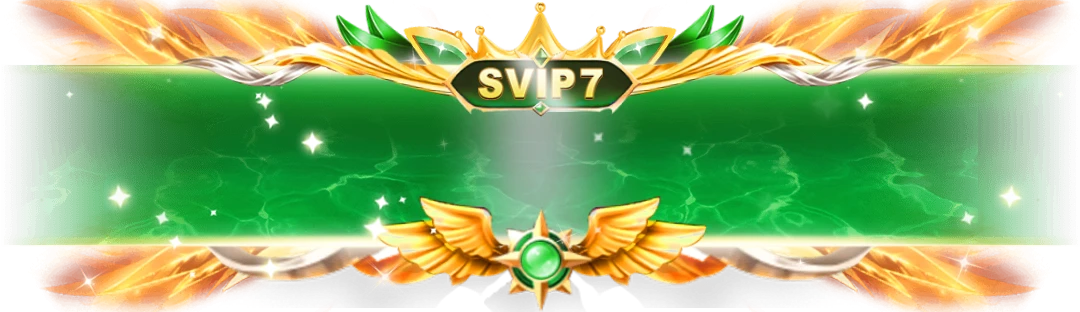 1080×312 · 2s
BannersSVGA
SVIP 7 Emerald Banner
Where to get ready-made SVGA files
You can commission each animation from a designer, or start from a ready-made library. SVGA Store has 4,500+ files built for live-streaming and voice chat apps — browse every SVGA animation, or start with a collection: gifts, entry effects, avatar frames or VIP animations. Every file plays live on its page before you buy, and downloads the moment you pay.


