The seven-day check-in: designing a sign-in calendar that people finish
A daily check-in calendar is one of the simplest retention features in a live app. How to design the seven days, why every box needs a plain and a glowing state, and what the Sign-in Treasure Box Pack holds.
svgastore team3 min read

The daily check-in calendar is a small feature with a large job. It gives people a reason to open the app every day for a week, and the last day of a streak is often the moment a casual user turns into a regular one. It also costs very little to build: seven boxes, a counter and a reward table. Most of the work is in making each day feel slightly better than the one before.
Seven boxes that climb
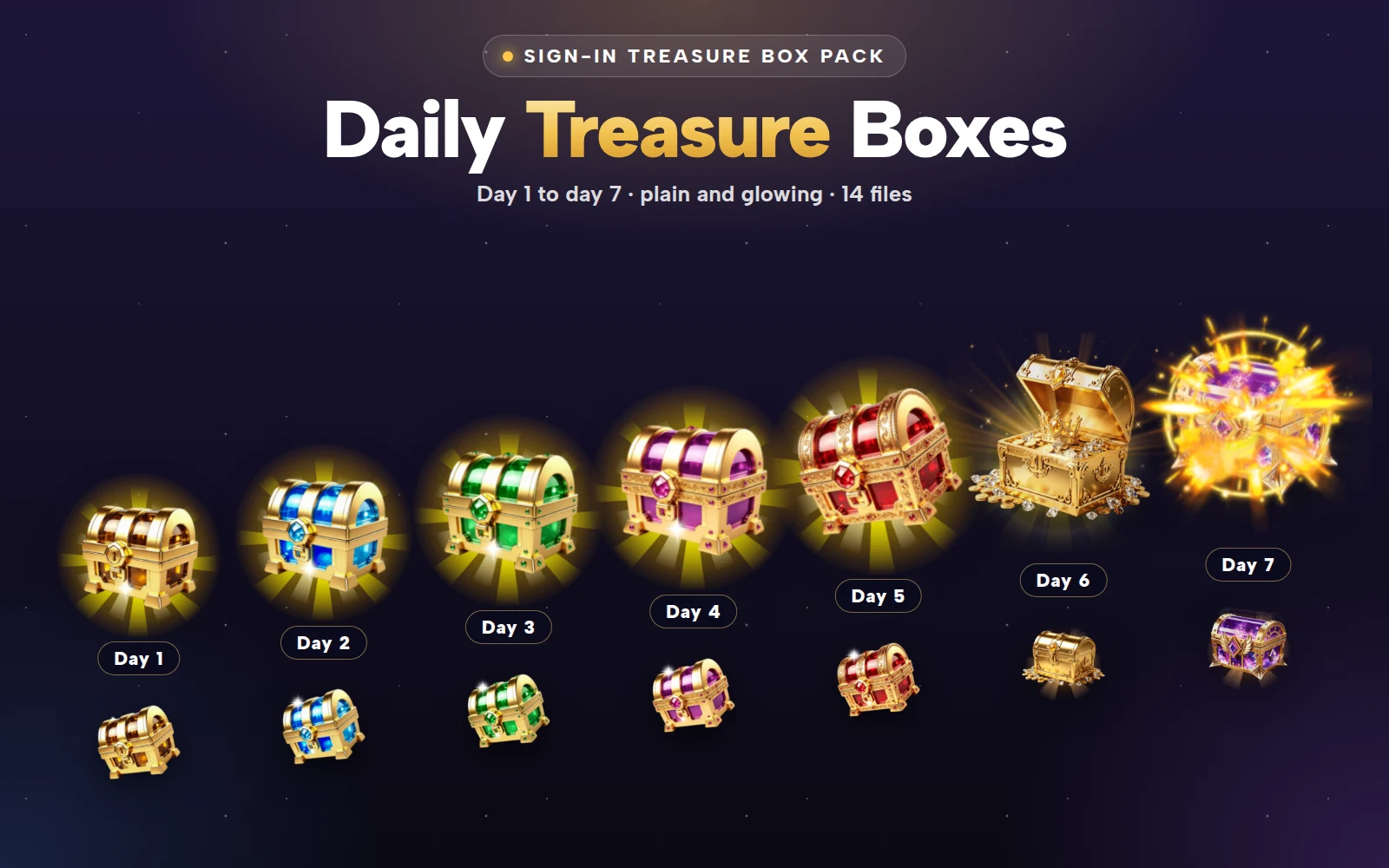
The Sign-in Treasure Box Pack is a full seven-day calendar. Days 1 to 5 are jewelled boxes in gold, sapphire, emerald, violet and ruby. Day 6 is a classic gold chest that opens on gold coins, and day 7 is a winged crystal chest that bursts open. The change of shape on the last two days is deliberate: from the first day, a user can see that the end of the week is worth reaching.
 112×112 · 3.1s
Treasure SetsSVGA
Sign-in Box Lv 1
 128×128 · 2s
Treasure SetsSVGA
Sign-in Box Lv 6
 128×128 · 2s
Treasure SetsSVGA
Sign-in Box Lv 7
Two states for every day
Each day comes twice, plain and glowing, which is how seven days make 14 SVGA files.
Plain is the box at rest: a day already claimed, or a day still to come.
Glowing is the box that can be claimed right now.
That difference is the whole interface. When a user opens the calendar, their eye should go straight to the one glowing box, and they should not have to read a word to know what to tap.
| Day | Plain | Glowing |
|---|---|---|
| 1–5 | 112×112, 15 fps, 3.1 s, 24–28 KB | 296×296, 15 fps, 3.1 s, 58–62 KB |
| 6 | 128×128, 20 fps, 2 s, 32 KB | 750×750, 20 fps, 2 s, 313 KB |
| 7 | 128×128, 20 fps, 2 s, 58 KB | 600×600, 12 fps, 4.4 s, 450 KB |
The whole calendar weighs about 1.3 MB, and the plain boxes for days 1 to 5 are under 30 KB each. You can bundle the entire set in the app and never wait on a download.
 296×296 · 3.1s
Treasure SetsSVGA
Sign-in Box Lv 1 Glow
 296×296 · 3.1s
Treasure SetsSVGA
Sign-in Box Lv 3 Glow
 296×296 · 3.1s
Treasure SetsSVGA
Sign-in Box Lv 5 Glow
Laying out the calendar
A layout that works on a phone:
Days 1 to 6 in a grid, two rows of three, using the plain boxes at their native 112 or 128 px.
Day 7 on its own row, wider than the others, so the final reward is visibly bigger.
The claimable day swaps to its glowing version, drawn larger than its slot so the glow spills over the edges.
Claimed days stay plain with a tick over them, so the user can see their streak at a glance.
When the user taps the glowing box, play the claim, show the reward for a second or two, and then return the box to its plain state with a tick. Days 6 and 7 have bigger glowing canvases (750×750 and 600×600) because their open is the celebration: let them play over the centre of the screen rather than inside their slot.
 750×750 · 2s
Treasure SetsSVGA
Sign-in Box Lv 6 Glow
- 600×600 · 4.4s
Treasure SetsSVGA
Sign-in Box Lv 7 Glow
Streak rules that keep people coming back
Decide what a missed day does, and say it. The friendliest rule is that a missed day pauses the streak rather than resetting it. If you reset, show the warning on the calendar the day before.
Make the rewards climb. Each day should be a little better than the last, and day 7 clearly the best. The boxes already climb in look; let the rewards follow.
Reset the week cleanly. After day 7, start a new week at day 1 the next morning, using the same boxes.
Use one daily reset time for everyone in a region and show it on the calendar, so users know when the next box unlocks.
Beyond the calendar
The same idea, a box that waits and then glows when it is ready, works for other rewards: an online-time bonus, a first-gift reward, or a weekly task list. For a bigger chest system with levels and openings, the Treasure Box Full Pack and the Countdown Treasure Chest Pack cover the event side.

Sign-in Treasure Box Pack
Seven daily check-in treasure boxes, plain and glowing
Next step
Write your seven rewards in a table, smallest first, and decide your missed-day rule. Then open the 14 files in the free viewer and check that each glowing box is unmistakable on your calendar's background colour. The Sign-in Treasure Box Pack is sold only as the whole pack.