Room levels: rewarding the rooms that stay busy
Users have levels, so why not rooms? How to design a room level system from Lv 1 to Lv 6, where the banner, medal and tag each appear, and how the Room Level Pack's 36 files fit together.
svgastore team4 min read

Most level systems reward a person: the sender who spends, the host who streams, the user who logs in every day. A room level rewards something different, the group effort of keeping a room alive. The owner gets a reason to open the room every evening, regulars get a sense of building something together, and visitors scrolling the room list get a quick signal of which rooms are worth joining.
What should earn room XP
A room level only works if people can see the link between what they do and the level going up. Good inputs are things the whole room contributes to:
Time with people on the mic. Count minutes when at least two seats are occupied, not minutes the room is merely open.
Unique visitors. Count each user once a day, so one person entering and leaving does not inflate the score.
Gifts sent inside the room. Weight them by value, but cap the daily contribution so a single big sender cannot level a room overnight.
Room events completed. Treasure boxes opened, PK rounds finished, red packets claimed.
Show the room's progress to the next level on the room info page. People work harder for a bar they can see than for a number they cannot.
Six levels, six colours
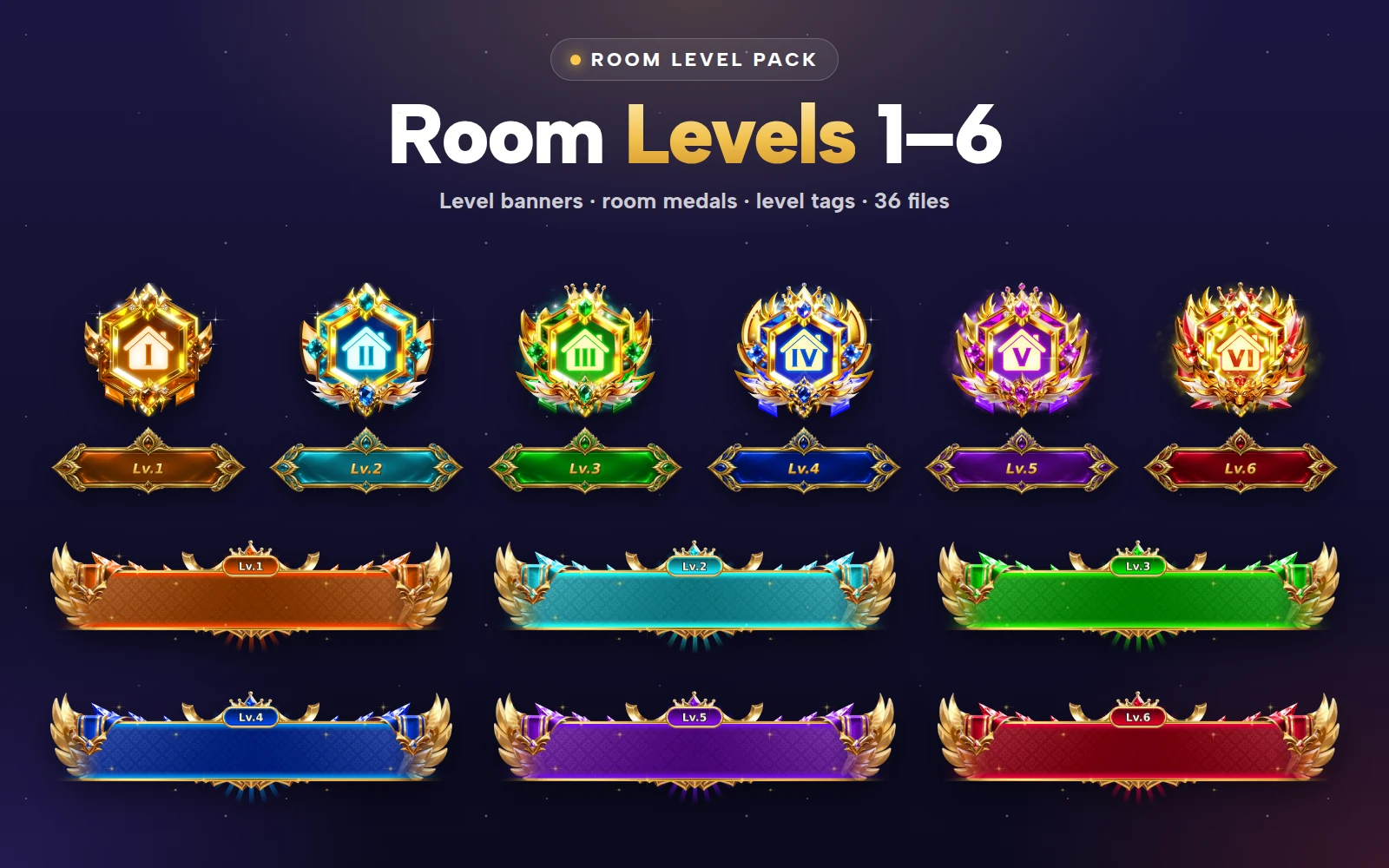
The Room Level Pack covers levels 1 to 6, each in its own colour: amber, teal, emerald, sapphire, violet and ruby. Six is a good length for a room ladder. Rooms level much more slowly than users, because their XP is shared, and a short ladder means a busy room can reach the top in weeks rather than never.
 450×316 · 3s
Room Level SetsSVGA
Room Level 1 Medal
 450×316 · 3s
Room Level SetsSVGA
Room Level 3 Medal
- 450×316 · 3s
Room Level SetsSVGA
Room Level 6 Medal
Three pieces, three places
Each level has three animations, and each one belongs to a different spot in the app.
| Piece | Canvas | Frame rate | Length | Size | Where it goes |
|---|---|---|---|---|---|
| Banner | 750×240 | 20 fps | 6 s | 1.40–1.44 MB | Level-up announcement |
| Medal | 450×316 | 20 fps | 3 s | 134–572 KB | Room info page and room header |
| Tag | 536×191 | 12 fps | 1.3 s | 546–556 KB | Beside the room name |
The banner: the level-up moment
The winged banner is the celebration. Play it once across the top of the room when the room reaches a new level, and consider broadcasting it to the room's followers. At six seconds it is long enough to read, so put the room name and the new level as text next to it rather than relying on the artwork alone.
The medal: the room's identity
The medal is the piece people will associate with the room. Show it on the room info page and in the room header, where there is only one at a time and it can animate freely. The lower levels are light (134 KB at level 1); the higher ones carry more detail and reach 572 KB.
The tag: the room list
The tag sits next to the room name. In the room list, where dozens of rooms appear together, use the PNG still. Animate the tag only inside the room or on its info page.
 750×240 · 6s
Room Level SetsSVGA
Room Level 1 Banner
 750×240 · 6s
Room Level SetsSVGA
Room Level 6 Banner
 536×191 · 1.3s
Room Level SetsSVGA
Room Level 6 Tag
The stills
All 18 animations come with a PNG still at the same canvas, which is why the pack holds 36 files: banner stills of about 145 KB, medal stills of 136 to 228 KB and tag stills of 103 to 110 KB. Use them for lists, search results, notifications and any screen where many rooms appear at once. Because the canvas is identical, you can swap a still for its animation when the item comes into focus, without the layout moving.
 450×316
Room Level SetsPNG
Room Level 6 Medal Still
 536×191
Room Level SetsPNG
Room Level 6 Tag Still
 750×240
Room Level SetsPNG
Room Level 6 Banner Still
Keep the levels fair
A few rules stop a room level from becoming a leaderboard of wallets:
Decay slowly, if at all. A room that loses a level after one quiet week feels punished. If you add decay, make it gentle and warn the owner first.
Show the level only after it is earned. New rooms can show no tag at all until level 1, which makes the first level a real milestone.
Reward the room, not only the owner. Give regulars a small badge or entry when their room reaches a new level, so they share in it.


Room Level Pack
Room levels 1 to 6: banners, medals and tags
Next step
Write down your room XP formula and the threshold for each of the six levels, then play the six banners one after another in the free viewer to check the colour order reads as a climb. The Room Level Pack holds all 36 files and is sold as one pack.