Families and clans: designing animation for group identity
A family feature needs a home, a level, a weekly rhythm, rewards and a welcome. How to plan each with real SVGA backgrounds, horde week tiers and reward icons.
svgastore team6 min read

Most animation in a live room celebrates an individual: the sender, the VIP, the winner of a round. A family or clan feature asks for something different – visuals that belong to a group, change as that group grows, and give members a shared reason to come back each week. This post walks through what that layer needs, drawing on the 27 files in the Families & Clans collection.
What a family feature has to show
Before choosing any artwork, list the jobs. A family system usually needs to communicate five things:
Home – the family page, where members land and recognise their group.
Standing – the family's level, and how it compares with others.
Rhythm – what the family has done this week.
Rewards – what members earn for taking part.
Welcome – how a newcomer finds and joins a family.
The collection is entirely SVGA, with files from 6.7 KB to 965 KB and a median of 42 KB. That median matters: most of a family screen can be animated without a heavy download.
Backgrounds that grow with the family
The family page background is the strongest identity signal you have, because every member sees it on every visit. The store has two background series in different shapes:
| File | Canvas | fps | Length | Size |
|---|---|---|---|---|
| Family Background Level 1 | 750x1060 | 30 | 3 s | 271 KB |
| Family Background Level 2 | 750x1060 | 30 | 3 s | 392 KB |
| Family Background Level 3 | 750x1060 | 30 | 3 s | 572 KB |
| Family Background Level 4 | 750x1060 | 30 | 3 s | 806 KB |
| Family Background Level 5 | 750x1060 | 30 | 3 s | 965 KB |
| Family Background Level 8 | 750x782 | 12 | 4 s | 201 KB |
| Family Background Level 16 | 750x782 | 12 | 4 s | 33 KB |
| Family Background Level 21 25 | 750x782 | 12 | 4 s | 42 KB |
| Family Background Level 26 50 | 750x782 | 12 | 4 s | 43 KB |
In the first series, file size climbs steadily from 271 KB at Level 1 to 965 KB at Level 5. Each step is a heavier file than the one below it, so plan your loading around the top of the ladder, not the bottom – and preview the levels side by side to check that each upgrade looks like a step up.
The second series uses a shorter canvas, runs at 12 fps for 4 seconds and is mostly far lighter. Two of its names – Level 21 25 and Level 26 50 – point to backgrounds that cover a band of levels rather than a single one.
Three practical points:
Map levels to bands. A family system can run to dozens of levels, but members only need to feel a change at milestones. Give Levels 1 to 5 their own backgrounds, then switch to wider bands above, and every upgrade still means something.
Mind the two heights. The series use different canvases – 1060 against 782 pixels tall at the same 750 width. If you mix them, design the header for a fit rule, or the family page will jump in height when a family crosses from one series to the other.
Keep the name out of the artwork. Draw the family's name, emblem and member count in native UI over the background. One file then serves every family at that level, and names in any script render correctly.
 750×1060 · 3s
FamiliesSVGA
Family Background Level 1
- 750×1060 · 3s
FamiliesSVGA
Family Background Level 5
 750×782 · 4s
FamiliesSVGA
Family Background Level 26
Weekly rhythm: horde week levels
"Horde" is another word for a clan, and these files suit a weekly cycle. Horde Week Level 1 to Level 3 share a 190x242 canvas, 20 fps and a 5.8-second play, at 24 to 25 KB each. Three tiers fit a weekly target that resets: for example, a family reaches Level 1 with modest group activity and Level 3 only when most members pitch in.
Daily participation sits underneath. The Icon Horde Active Reward Prop Day files run from Level 1 to Level 4, each 1.8 seconds at 20 fps and between 6.7 KB and 8.0 KB. Levels 1 to 3 are 110x110 while Level 4 is 150x150, so give that slot room or a fit rule. Horde Prop Flash (130x160, 2.9 seconds, 61 KB) works as a highlight when an item is earned.
Because the week resets, the animation should mark change rather than decorate permanently. Play the tier file when the family crosses a threshold, or the first time a member opens the page that week, and show a still frame the rest of the time.
Rewards members can see
Family Reward Chest, Family Reward and Family Reward II are each 72x72, 20 fps, 4 seconds and 18 KB. A canvas that small is made for list rows: a task list, a contribution tracker, a reward calendar. Animate the chest only when it is claimable, so motion in the list always means "something is waiting for you".
| Group file | Canvas | fps | Length | Size |
|---|---|---|---|---|
| Horde Week Level 1–3 | 190x242 | 20 | 5.8 s | 24–25 KB |
| Icon Horde Active Reward Prop Day Level 1–3 | 110x110 | 20 | 1.8 s | 6.7–7.3 KB |
| Icon Horde Active Reward Prop Day Level 4 | 150x150 | 20 | 1.8 s | 8.0 KB |
| Horde Prop Flash | 130x160 | 20 | 2.9 s | 61 KB |
| Family Reward Chest | 72x72 | 20 | 4 s | 18 KB |
| Family Guide Join Reward Item | 210x203 | 20 | 3.5 s | 178 KB |
| Family Activity Entrance | 70x70 | 15 | 2 s | 31 KB |
Welcoming new members
Families grow through newcomers, so the joining path deserves a little motion. Family Activity Entrance is a 70x70 icon that suits a room or home-screen shortcut. Family Guide Join Reward Item can show what a member receives for joining. The member list guide comes in a standard version and a right-to-left version; mirroring a file at runtime flips everything in it, including any lettering or numbers, so a purpose-made RTL file is the safer choice for Arabic or Urdu interfaces.
Family identity can follow members beyond the family page, too: the store also has family red envelopes and rank frames for the top three families on a leaderboard.
 210×203 · 3.5s
FamiliesSVGA
Family Guide Join Reward Item
 70×70 · 2s
FamiliesSVGA
Family Activity Entrance
 257×126 · 0.9s
FamiliesSVGA
Family Member List Guide RTL II
Getting the set
The Family Level Pack collects the family backgrounds from Level 1 to 26 plus the family reward chest: 13 files for less than buying them one by one. The horde week, daily icon, prop flash and join-flow files in the table above are sold on their own, so add those ten files if you want the weekly and onboarding layers too.
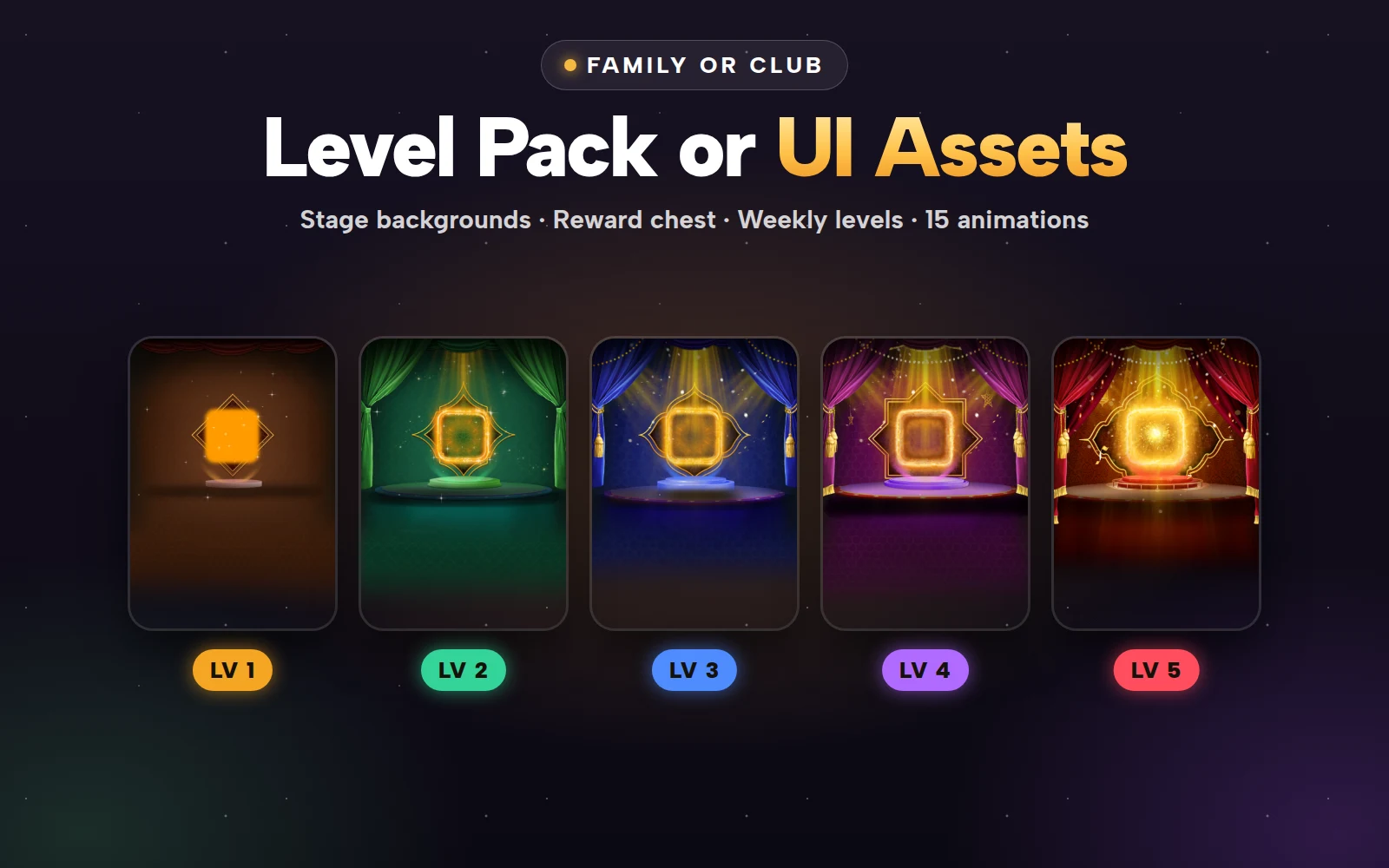


Family or Club Level Pack
Family or club backgrounds Level 1 to 26 and the reward chest
Next step
Write down your family level bands and weekly targets first, then pick one background per band. Drop the candidates into the free SVGA and PAG viewer and check them on the dark background your family page will use, with your header height in mind.