Broadcast banners that work in LTR and RTL rooms
Gift, lucky, game and message broadcasts share one wide strip of screen. How to size and tier them, and why Arabic and Urdu rooms need real right-to-left versions, not mirrored copies.
svgastore team5 min read

Flip a broadcast banner horizontally to make an Arabic version and the problem shows in the first frame: the logo reads backwards, the digits in a gift count are mirrored and the shine sweeps the wrong way across the sender's name. Broadcast bars are among the most-read strips in a live room and deserve a proper right-to-left version, not a mirrored copy. This guide covers what each broadcast type is for, the canvas sizes in the Banners & Broadcasts collection, and how to ship LTR and RTL pairs without touching your layout code.
Four jobs, one strip of screen
A broadcast banner is a wide bar that slides across a room to announce something. There are four common kinds:
Gift broadcasts announce a big gift: sender, receiver, gift and count. Tiers make a bigger gift look bigger.
Lucky broadcasts announce a lucky-gift win or multiplier, so they need space for a number that changes every time.
Game broadcasts celebrate a win in a room game and often link through to the game itself.
Message broadcasts carry a short paid or privileged message, so the text area matters more than the art.
Scope is the second decision. A room broadcast is seen by everyone in one room; a global broadcast travels across the whole app and should be rarer, shorter and more distinctive. That is where top-tier pieces such as the SVIP 7 to 12 banners belong. When you build the set, look for files that already come in pairs, like the lucky-gift broadcast and its RTL partner, or the game broadcast and its RTL version.
Canvas sizes in the collection
The collection holds 300 files, 235 SVGA and 65 PAG, ranging from 4.1 KB to 2.04 MB with a median of 177 KB. Its leading files show the main canvas shapes:
| File | Canvas | fps | Length | Size |
|---|---|---|---|---|
| SVIP 7 Emerald Banner | 1080×312 | 15 | 2 s | 237 KB |
| Banner Room 1 | 900×300 | 20 | 4 s | 183 KB |
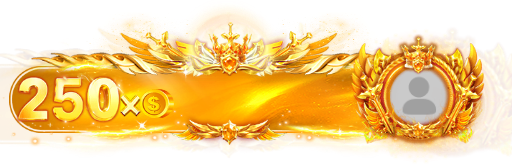
| En250 and Ar250 | 750×240 | 15 | 5 s | 428 KB |
| Broadcast CP and Broadcast Cprtl | 720×220 | 20 | 5 s | 401 KB |
| Broadcast Banner Room PK Level 1 and its Rl version | 750×180 | 20 | 6 s | 129 KB |
| Custom Gift Effect 7 | 720×297 | 20 | 8.7 s | 1000 KB |
Three things stand out:
Shape varies as much as size. A 750×180 PK strip is a thin ribbon; a 900×300 room banner is a proper panel. Match the canvas to your slot, because stretching a banner to another height crops the art or squeezes the text.
Length follows purpose. The SVIP banners run for 2 seconds, the PK strips for 6 and Custom Gift Effect 7 for 8.7. A global banner can be brief because it is unmistakable; a room broadcast carrying two names needs long enough to be read.
Size follows tier. En250, En500 and En1000 grow from 428 KB to 537 KB to 690 KB, and the three Room PK levels from 129 KB to 156 KB to 195 KB.
 750×240 · 5s
BannersSVGA
Gold 250 Coin Banner
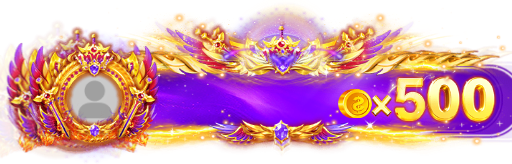 750×240 · 5s
BannersSVGA
Violet 500 Coin Banner
- 750×240 · 5s
Most viewedSVGA
Red 1000 Coin Banner
Why RTL needs its own file
Arabic and Urdu are both written right to left, and an app set in either language mirrors its whole layout: avatars sit on the right, text starts at the right edge, and motion that suggests arrival travels leftwards. A left-to-right banner fights all of that: the avatar slot is on the wrong side and any sweep or arrow points backwards.
Mirroring the whole file is not the fix:
Lettering flips. Any word, logo or number baked into the art becomes unreadable. Digits are the classic trap: inside Arabic and Urdu text, numbers are still written left to right, so a mirrored 1000 is wrong in every language.
Lighting flips. Highlights drawn for a light source on one side end up on the other and clash with the rest of your interface.
Slots move without your code knowing. If you place the avatar and name over named layers, a mirrored canvas moves the art but not your assumptions about where those layers sit.
A proper RTL version is recomposed to read from the right while keeping the same canvas, timing and slots. In these pairs the right-to-left file carries Ar, rtl or Rl in its name, and in each pair in the table the canvas, frame rate, length and file size match exactly. En1000 and Ar1000, for example, are both 750×240 at 15 fps, 5 seconds and 690 KB.
- 750×240 · 5s
Most viewedSVGA
Red 1000 Coin Banner
 750×240 · 5s
BannersSVGA
Red 1000 Banner RTL
 720×220 · 5s
BannersSVGA
Broadcast CP
 720×220 · 5s
BannersSVGA
Broadcast CP RTL
 750×180 · 6s
BannersSVGA
Broadcast Banner Room PK Level 1
 750×180 · 6s
BannersSVGA
Rl Broadcast Banner Room PK Level 1
Wiring LTR and RTL pairs
Because each pair shares its specs, switching direction should be a file swap, not a layout change.
Choose by the viewer's layout direction, not the sender's language. A global broadcast sent from an English-language room still needs the RTL file on a phone set to Arabic. Pick the file from the layout direction your UI framework already exposes.
Keep names and numbers out of the art. SVGA players can replace a named image layer, such as the avatar, and draw text onto a named layer at runtime; libpag can do the same with editable text and image layers in PAG files. Let the platform's text engine handle mixed-direction names, such as a Latin username inside an Arabic sentence.
Register pairs as one asset. Store each banner as one entry with an LTR and an RTL file, so nobody ships a new tier in one direction only.
Queue, don't stack. When several broadcasts fire at once, play them one after another and drop or merge the lowest tier first if the queue grows.
Test both directions side by side
Open each pair together in the free SVGA & PAG viewer, which plays up to ten files at once on one background. Check that the avatar slot, text area and motion mirror cleanly while the timing stays identical, then repeat on the dark stage, because broadcast bars play over a busy room rather than a blank screen.
Next step
For a ready-made set, the Room Broadcast Banners pack gathers 15 gift alerts and room-wide announcement bars for less than buying them one by one. The VIP Broadcast & Entry Pack adds 17 files of VIP gift broadcasts, entry notices and gift banners in LTR and RTL. Start with one tiered gift broadcast and its RTL partner, test both directions, then grow the set.