
600×600 · 4s
Party FXSVGA
New: App Starter Pack — 368 files for a new app at $199 (Save 64%)See the pack
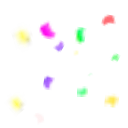
Scattered confetti in five bright colours
Loose flecks of yellow, magenta, green, violet and coral confetti are scattered over an otherwise clear square, softly blurred at the edges. Behind a big-prize winner or the top row of a rank list, this 64×64 SVGA adds colour for just 10 KB.
Price
USD · one-time purchase
Secure checkout · your file unlocks the moment payment completes.
Format
SVGA 2.x
Dimensions
64×64
Duration
1.2s
Frame rate
30 fps
Frames
36
File size
9.7 KB
Bitmaps
10
Audio
No
Prize Rank Confetti Flecks is an SVGA party effect animation for live-streaming and voice chat apps. Loose flecks of yellow, magenta, green, violet and coral confetti are scattered over an otherwise clear square, softly blurred at the edges. Behind a big-prize winner or the top row of a rank list, this 64×64 SVGA adds colour for just 10 KB.
It runs 36 frames at 30 fps — 1.2s per loop — on a 64×64 canvas, built from 18 sprites and 10 bitmaps, with no audio. The whole file is 9.7 KB, small enough to bundle inside your app instead of downloading it on demand, and it plays with SVGAPlayer on Android, iOS, Flutter and web.
| SKU | AVG-4558 |
|---|---|
| File name | prize_rank_confetti_flecks.svga |
| Format | SVGA 2.xProtobuf + zlib, the format SVGAPlayer reads |
| Version | 2.1.0 |
| File size | 9.7 KB9,916 bytes |
| Dimensions | 64 × 64 px |
|---|---|
| Aspect ratio | 1:1 |
| Shape | Square |
| Suggested stage | Dark background |
| Frame rate | 30 fps |
|---|---|
| Frames | 36 |
| Duration | 1.2s1200 ms per loop |
| Frame time | 33.3 ms |
| Sprites | 18 |
|---|---|
| Bitmap images | 10 |
| Audio track | No |
| Category | Reactions & Party Effects |
| Added | Oct 14, 2026 |
Figures are read from the .svga file itself (movie params, sprite and image tables), not typed in by hand.
More Party FX
More from Reactions & Party Effects and matching tags — hover a card, or tap its play button, to see it move.
Party FXSVGA
Party FXSVGA
Party FXSVGA
Party FXSVGA

Party FXSVGA

Party FXSVGA

Party FXSVGA

Party FXSVGA

Party FXSVGA

Party FXPAG

Party FXSVGA

Party FXSVGA